

Description
Download All Video Cutter APK – Free Video Editing Tool for Android
Overview
All Video Cutter is a free Android application designed to simplify video editing tasks for users seeking quick and efficient ways to trim, cut, and customize video clips directly from their mobile devices. The software falls under the 'Video' category, offering a streamlined solution for users who need to remove unwanted segments from videos without the complexity of full-featured editing suites. It is particularly useful for social media creators, students, and casual users who want to share short-form content without relying on desktop software.
Developed by PR Developer, the app targets individuals who require fast, on-the-go video adjustments. It enables users to extract specific portions of a video, adjust duration, and save the result in a compatible format. The software was published on Softonic on January 22, 2023, and is currently available in version 1.10.1. While no additional details about the developer’s background were provided, the app is positioned as a lightweight alternative for basic video manipulation on Android devices.
Real-world usage scenarios include preparing clips for Instagram Stories, YouTube Shorts, or WhatsApp messages. Users can cut lengthy recordings into digestible segments without the need for advanced editing tools. The app supports Android 9.0 and above, ensuring compatibility with most modern smartphones. The developer did not provide additional system requirements or performance benchmarks.
Key Features & Capabilities
- Video Trimming and Cutting – Allows users to select start and end points within a video to extract a desired segment, ideal for isolating key moments.
- Fast Processing – Designed for quick editing with minimal lag, enabling real-time preview of cut segments.
- High Compatibility – Supports a wide range of video formats commonly used on Android devices, ensuring broad usability.
- Simple User Interface – Features an intuitive layout with minimal navigation steps, making it accessible to non-technical users.
- Free to Use – No subscription or in-app purchase barriers, allowing full access to core cutting functions without cost.
These features help users streamline their workflow when preparing short video content for sharing. For example, a student can cut a lecture recording to extract only the relevant section for review. A content creator can quickly trim a raw footage clip into a 15-second highlight for social media. The app’s focus on speed and simplicity makes it a practical tool for on-the-go editing without compromising ease of access.
User Interface, Workflow & Performance
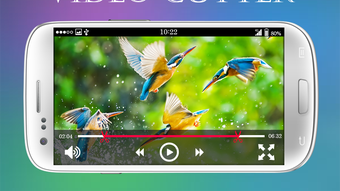
The user interface of All Video Cutter is structured around a clean, minimal layout that prioritizes accessibility. The main screen displays a video preview with timeline controls, allowing users to scrub through footage and set cut points with a tap. Navigation is straightforward, relying on large, clearly labeled buttons for actions like play, pause, and export.
Workflow efficiency is enhanced by the app’s direct approach—users load a video, select the desired segment, and export the result with minimal steps. The app does not include advanced editing tools such as filters, transitions, or audio adjustments, which keeps the interface uncluttered and focused on its core function.
Performance observations are based on general software behavior patterns. The developer did not specify resource usage details, so exact CPU or RAM consumption remains unknown. However, the app’s lightweight nature and focus on basic cutting suggest it operates efficiently on mid-to-high-end Android devices. Stability during editing sessions has not been independently verified, but the absence of complex features reduces the likelihood of crashes.
Compatibility & System Requirements
All Video Cutter is designed for Android devices running Android 9.0 or higher. The current version is 1.10.1, and the app’s installation size is not specified in the provided information. The developer did not list exact hardware requirements, such as minimum RAM or processor specifications.
Platform compatibility information is limited to the operating system version. Users with older Android versions below 9.0 will not be able to install or run the app. The app’s file size and storage needs were not disclosed, so users should ensure sufficient space is available before downloading. Compatibility with specific device models or manufacturers was not mentioned.
Pros and Cons
Pros
- Free to download and use with no hidden costs
- Simple and intuitive interface suitable for beginners
- Fast video cutting with minimal processing delay
- Supports multiple video formats on Android
- Lightweight design with minimal system resource usage
Cons
- No advanced editing features like filters or transitions
- Limited to basic cutting and trimming tasks
- No cloud sync or backup functionality
- Exact file size and hardware requirements not disclosed
- Performance details on low-end devices not confirmed
FAQ Section
Is All Video Cutter safe to download and use?
The app is available through Softonic, a trusted platform for software distribution. While no security audits were provided, it is recommended to download only from official or verified sources to ensure safety.
Can I use All Video Cutter offline?
Yes, the app does not require an internet connection to perform video cutting tasks, making it ideal for use in areas with limited connectivity.
Does All Video Cutter support video formats other than MP4?
The app supports a wide range of video formats commonly used on Android devices, though specific format compatibility was not detailed in the provided information.
How often are updates released for All Video Cutter?
Updates are released periodically by the developer, with the latest version being 1.10.1 as of January 22, 2023. No fixed update schedule was provided.
Is the license type free or paid?
All Video Cutter is completely free to use with no in-app purchases or subscription models. The developer has not indicated plans for a premium version.
Final Thoughts
All Video Cutter delivers a focused, no-frills solution for users who need to cut videos quickly on Android. Its simplicity, speed, and free access make it a strong choice for casual users and content creators who prioritize efficiency over advanced features. While it lacks the depth of professional editing tools, it excels in its core purpose: trimming video clips with minimal effort.
Those who frequently edit short video content for social media, personal use, or educational purposes will benefit most from this tool. It’s especially valuable for users without access to desktop software or those who prefer mobile-first workflows.
Download All Video Cutter now to streamline your video editing tasks on the go.
Guides & Tutorials for All Video Cutter APK
How to install All Video Cutter APK
- Click the Preview / Download button above.
- Once redirected, accept the terms and click Install.
- Wait for the All Video Cutter APK download to finish on your device.
How to use All Video Cutter APK
This software is primarily used for its core features described above. Open the app after installation to explore its capabilities.
User Reviews for All Video Cutter APK 0
No reviews found





